You upgrade the Home Assistant container, the UI loads through your reverse proxy, and everything looks fine. Five minutes later Home Assistant restarts on its own and every request through the proxy returns 400: Bad Request. The log says Received X-Forwarded-For header from an untrusted proxy, even though the proxy’s IP is inside a network you listed in trusted_proxies.
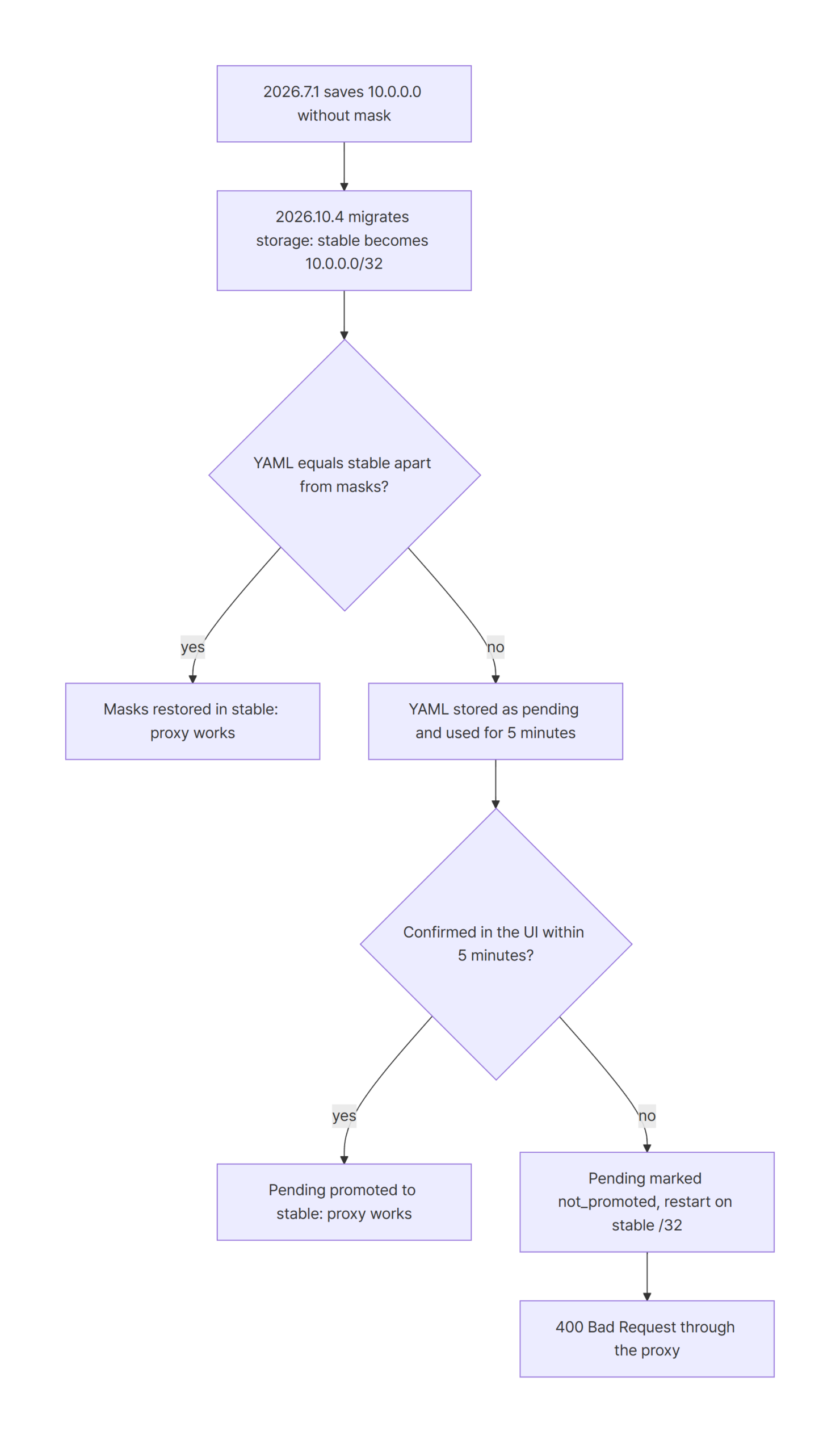
Home Assistant 2026.7.1 and older saved
trusted_proxiesto.storage/httpwithout the netmask, and the 2026.8+ storage migration turns those entries into/32.
If yourhttp:YAML differs from that saved copy, the YAML is only tried as apendingconfig, and it reverts to the/32list after 5 minutes without confirmation.
Stop Home Assistant, put the right prefix lengths intodata.stable.trusted_proxiesin.storage/http, and start it again.
Environment
I reproduced this with Docker Compose: one Home Assistant container and one nginx container on a fixed bridge network, so the proxy always connects from the same address.
| Item | Version |
|---|---|
| Home Assistant (upgrade target) | ghcr.io/home-assistant/home-assistant:2026.10.4 |
| Home Assistant (starting version) | ghcr.io/home-assistant/home-assistant:2026.7.1 |
| Home Assistant (comparison) | ghcr.io/home-assistant/home-assistant:2026.7.4 |
| Reverse proxy | nginx:1.30.6-alpine (nginx/1.30.6) |
| Docker Engine | 29.9.2 (Docker Desktop) |
| Docker Compose | v5.6.1 |
Reproduce the 400 Bad Request after the image upgrade
The lab puts nginx at 172.30.83.10 and Home Assistant at 172.30.83.20. Port 28080 goes through nginx, and port 28123 reaches Home Assistant directly, which the script uses only to check that the server is up.
name: ha-trusted-proxies-cidr-migration-bug

services:
  homeassistant:
    image: ghcr.io/home-assistant/home-assistant:${HA_VERSION:-2026.10.4}
    volumes:
      - ./.tools/config:/config
    environment:
      - TZ=UTC
    ports:
      - "28123:8123"
    networks:
      labnet:
        ipv4_address: 172.30.83.20

  nginx:
    image: nginx:1.30.6-alpine
    volumes:
      - ./nginx.conf:/etc/nginx/conf.d/default.conf:ro
    ports:
      - "28080:80"
    depends_on:
      - homeassistant
    networks:
      labnet:
        ipv4_address: 172.30.83.10

networks:
  labnet:
    ipam:
      config:
        - subnet: 172.30.83.0/24
The labnet network pins the subnet to 172.30.83.0/24, so the fixed ipv4_address values work. The HA_VERSION variable lets the same Compose file run the old and the new image against one config folder, which is what a real image upgrade does.
nginx adds the client address to X-Forwarded-For. That header is what makes Home Assistant check whether the connecting peer is a trusted proxy.
server {
    listen 80;

    location / {
        proxy_pass http://172.30.83.20:8123;
        proxy_set_header Host $host;
        proxy_set_header X-Forwarded-For $proxy_add_x_forwarded_for;
        proxy_set_header X-Forwarded-Proto $scheme;
        proxy_http_version 1.1;
        proxy_set_header Upgrade $http_upgrade;
        proxy_set_header Connection "upgrade";
    }
}
The http: block is the usual setup that trusts all private ranges. The logger: entry only makes the HTTP config messages visible, since they are logged at INFO.
homeassistant:
  name: Lab

frontend:

logger:
  default: warning
  logs:
    homeassistant.components.http.config: info

http:
  use_x_forwarded_for: true
  trusted_proxies:
    - 10.0.0.0/8
    - 172.16.0.0/12
    - 192.168.0.0/16
nginx connects from 172.30.83.10, which sits inside 172.16.0.0/12. On 2026.7.1 a request through nginx gets the normal 401: Unauthorized that any unauthenticated API call gets. That means the proxy is trusted.
Then I stopped 2026.7.1, added one more range (100.64.0.0/10) to trusted_proxies, and started 2026.10.4 on the same config folder. Right after the upgrade, the proxy still works:
### start Home Assistant 2026.10.4
homeassistant ghcr.io/home-assistant/home-assistant:2026.10.4 running
nginx nginx:1.30.6-alpine running
ready after 6s (direct GET /api/ -> 401)
### request through nginx (172.30.83.10): GET http://localhost:28080/api/
HTTP/1.1 401 Unauthorized
401: Unauthorized
I didn’t touch anything after that. Five minutes later Home Assistant restarted itself, and the same request returned 400:
### request through nginx (172.30.83.10): GET http://localhost:28080/api/
HTTP/1.1 400 Bad Request
400: Bad Request
### Home Assistant log (http)
2026-11-02 10:02:16.402 INFO (MainThread) [homeassistant.components.http.config] Using pending HTTP config
2026-11-02 10:07:16.389 WARNING (MainThread) [homeassistant.components.http.config] Pending HTTP config was not confirmed within 0:05:00; reverting to the stable config and restarting
2026-11-02 10:07:20.294 INFO (MainThread) [homeassistant.components.http.config] Using stable HTTP config
2026-11-02 10:07:27.763 ERROR (MainThread) [homeassistant.components.http.forwarded] Received X-Forwarded-For header from an untrusted proxy 172.30.83.10
The timestamps tell the story. Using pending HTTP config at 10:02, the revert warning exactly five minutes later, and from then on Using stable HTTP config plus the untrusted proxy error. If you run Home Assistant behind a proxy only, this is the moment you lose the UI that you would need to fix it.
Cause: the stable trusted_proxies list in .storage/http is /32
The 2026.8 release moved the web server settings into the UI. The release notes say that on the first start after updating, YAML settings "move into the interface for you". Home Assistant keeps those settings in .storage/http. Before 2026.8, the same file already existed as a copy of the last working http: config for recovery mode.
2026.7.1 and older saved the network address only
This is the file 2026.7.1 wrote on shutdown, still in the old version 1 format:
### .storage/http
{
  "version": 1,
  "minor_version": 1,
  "key": "http",
  "data": {
    "use_x_forwarded_for": true,
    "trusted_proxies": [
      "10.0.0.0",
      "172.16.0.0",
      "192.168.0.0"
    ],
The masks are already gone. In the 2026.7.1 source, the recovery copy stores ip.network_address for each proxy. The 2026.7.4 source stores the whole network instead, with a comment saying that network_address alone "drops the netmask and would narrow e.g. 10.0.0.0/24 to a single host". I ran 2026.7.4 in the same lab, and its file kept 10.0.0.0/8, 172.16.0.0/12 and 192.168.0.0/16.
The storage migration turns bare addresses into /32
When 2026.10.4 starts, it migrates .storage/http to version 2. A bare address becomes a single-host network, so the stable slot ends up like this:
    "stable": {
      "use_x_forwarded_for": true,
      "trusted_proxies": [
        "10.0.0.0/32",
        "172.16.0.0/32",
        "192.168.0.0/32"
      ],
172.16.0.0/32 matches exactly one address. nginx at 172.30.83.10 isn’t that address, so the forwarded middleware logs the untrusted proxy error and raises a 400.
Your YAML only gets a five-minute trial as pending
The developers know about the lost masks. In 2026.10.4, async_migrate_yaml has a check named _stable_differs_only_by_lost_proxy_masks, with a comment that "Releases up to 2026.7.1 dropped the network mask". If your YAML matches the stored copy except for the masks, Home Assistant restores the masks in stable directly.
That check fails if anything else in the http: block differs. In that case the YAML goes into the pending slot instead. A pending config is a trial: Home Assistant runs it and waits for an administrator to confirm it. The HTTP integration docs say that if the settings are "not confirmed within 5 minutes, Home Assistant automatically returns to the previous settings". The previous settings are the /32 list.
After the revert, the file looks exactly like the two GitHub reports. stable holds /32 entries, and pending holds your correct list with an error:
    "pending": {
      "server_port": 8123,
      "use_x_forwarded_for": true,
      "trusted_proxies": [
        "10.0.0.0/8",
        "172.16.0.0/12",
        "192.168.0.0/16",
        "100.64.0.0/10"
      ],
...
      "error": "not_promoted",
      "error_message": null
    },
    "yaml_migration_done": true
"yaml_migration_done": true matters here. From now on Home Assistant ignores the http: block in configuration.yaml, and a pending config marked not_promoted is never tried again.
Which upgrades hit the /32 problem
I ran the same lab with different starting points. Every 2026.10.4 run waited until the five-minute trial had expired before the final request through nginx.
| Starting point | YAML at upgrade | stable.trusted_proxies after upgrade |
Through nginx after 5 minutes |
|---|---|---|---|
| 2026.7.1 | unchanged | /8, /12, /16 (restored), no pending |
401 (works) |
| 2026.7.1 | one range added | /32, /32, /32 |
400 Bad Request |
| 2026.7.4 | one range added | /8, /12, /16, the new range dropped |
401 (works) |
| none (new install on 2026.10.4) | the same http: block |
defaults, no use_x_forwarded_for |
400 Bad Request |
So the dangerous combination is an install that last ran on 2026.7.1 or earlier and an http: block that changed since that last run. A YAML change made at the same time as the upgrade is enough. The 2026.7.4 row has a quieter problem: the proxy keeps working, but the range you added is silently missing from the running config.
Fix: edit stable.trusted_proxies in .storage/http while Home Assistant is stopped
Both GitHub reports describe the same workaround: stop Home Assistant, correct stable.trusted_proxies in .storage/http, and start it again. The UI fix doesn’t help here because the UI is the thing you can’t reach through the proxy.
- Stop the container (
docker compose stop homeassistant, ordown). - Back up
config/.storage/http. - Replace the
/32entries underdata.stable.trusted_proxieswith your real networks. Use network addresses, as the docs require:192.168.1.0/24, not192.168.1.50/24. - Start the container again.
In the lab, fix-storage.sh does steps 2 and 3 with jq. A text editor works just as well; only the list under stable needs to change.
#!/usr/bin/env bash
# Restore the prefix lengths in data.stable.trusted_proxies of .storage/http.
# Run only while Home Assistant is stopped.
set -eu
file=$1
cp "$file" "$file.bak"
jq '.data.stable.trusted_proxies = ["10.0.0.0/8", "172.16.0.0/12", "192.168.0.0/16", "100.64.0.0/10"]' \
  "$file.bak" > "$file"
After the edit, the stable slot has the masks back:
    "stable": {
      "use_x_forwarded_for": true,
      "trusted_proxies": [
        "10.0.0.0/8",
        "172.16.0.0/12",
        "192.168.0.0/16",
        "100.64.0.0/10"
      ],
Then 2026.10.4 starts on the stable config, and the request through nginx is trusted again:
### start Home Assistant 2026.10.4
homeassistant ghcr.io/home-assistant/home-assistant:2026.10.4 running
nginx nginx:1.30.6-alpine running
ready after 6s (direct GET /api/ -> 401)
### request through nginx (172.30.83.10): GET http://localhost:28080/api/
HTTP/1.1 401 Unauthorized
401: Unauthorized
### Home Assistant log (http)
2026-11-02 10:13:46.715 INFO (MainThread) [homeassistant.components.http.config] Using stable HTTP config
Using stable HTTP config with no pending trial means nothing is scheduled to revert. The 401 is the expected answer for an API call without a token.
Don’t be alarmed by the UI after this fix. I opened Settings > System > Network on the fixed lab instance. The Reverse proxy part of the HTTP server card listed the four ranges with Trust X-Forwarded-For on, but the card still showed this warning: "The last HTTP configuration change was not confirmed in time and was rolled back. Home Assistant is running on the previous configuration." The edit only changed stable, so pending still holds the old trial with "error": "not_promoted", and the warning comes from that entry. The ranges in the list and the 401 through nginx are what tell you the fix worked.
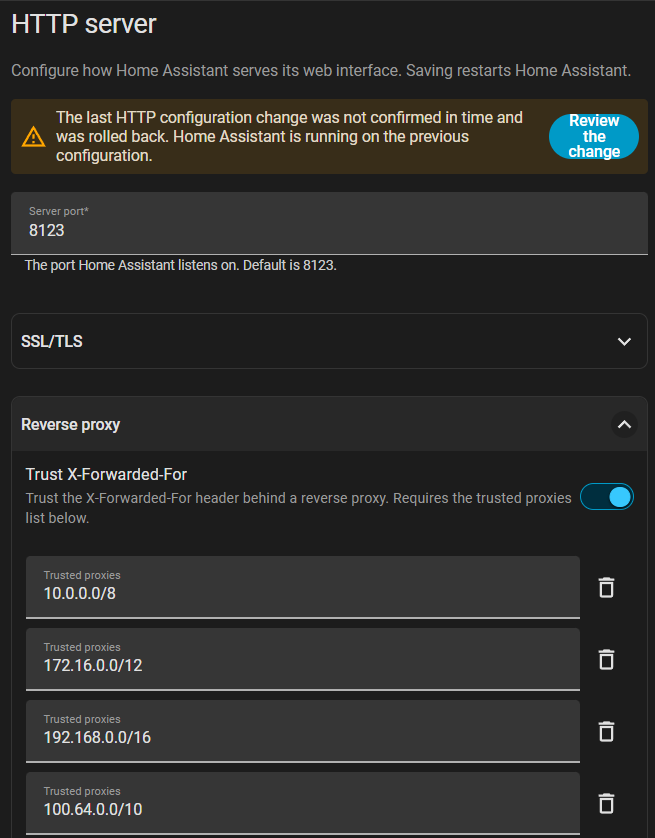
If you can still reach Home Assistant without the proxy, for example on http://<host-ip>:8123 from your LAN, you can avoid the file edit. Open Settings > System > Network, check the Trusted proxies list in the HTTP server section, save, and confirm the new settings after the restart. The docs describe this confirm step, but I didn’t test the UI path in the lab.
Pitfalls after the trusted_proxies migration
- Removing the
http:block doesn’t fix it. After the migration,yaml_migration_doneistrueand Home Assistant reads only.storage/http. The docs list a repair called "HTTP YAML configuration is ignored after migration" for exactly this state. - The correct values in
pendingwon’t come back by themselves. A pending config with"error": "not_promoted"is kept for inspection, but the source comment says it "is never applied again". Copy the list intostableinstead. - The first five minutes hide the problem. The pending trial uses your correct YAML, so a quick check right after the upgrade passes. Check again after the automatic restart, or confirm the settings in the UI during the trial.
- Unattended image updates make it worse. If an update tool swaps the image at night, nobody is around to confirm the trial, and the revert always happens.
- Your proxy IP still has to be inside a listed network. The fix restores the masks you had. If your proxy moved, for example to a new Docker network, add its range too.
- A new install with an old
http:block breaks the same way. With no saved copy,stableholds the defaults, so the revert turns reverse proxy support off.
On a new 2026.10.4 install, the 400 after the revert comes with a different log line:
2026-11-02 10:25:13.415 ERROR (MainThread) [homeassistant.components.http.forwarded] A request from a reverse proxy was received from 172.30.83.10, but your HTTP integration is not set-up for reverse proxies
If you set up a new install from an old configuration.yaml, confirm the HTTP settings in the UI within five minutes of the first start. You can also set Trust X-Forwarded-For and Trusted proxies in the UI instead of YAML.
Summary
- Home Assistant 2026.7.1 and older saved
trusted_proxiesin.storage/httpwithout the netmask. - The 2026.8+ storage migration turns those entries into
/32in thestableslot. - An
http:YAML that differs from the saved copy only runs as apendingtrial, and it reverts to/32after 5 minutes without confirmation. - The result is
400: Bad RequestandReceived X-Forwarded-For header from an untrusted proxyfor every proxied request. - Fix it by stopping Home Assistant, correcting
data.stable.trusted_proxiesin.storage/http, and starting it again.
References
- HTTP integration documentation
- Home Assistant 2026.8 release notes
- core issue #182040: http config migration corrupts trusted_proxies netmasks
- core issue #187375: trusted_proxies CIDR prefixes collapsed to /32 during .storage/http migration
- homeassistant/components/http/config.py at 2026.8.0
- homeassistant/components/http/config.py at 2026.10.4
- homeassistant/components/http/init.py at 2026.7.1
- homeassistant/components/http/init.py at 2026.7.4